Adobe Camera Raw

Better Tools for Tones: Why I Don’t Look at the Histogram — CreativePro.com article

Better Tools for Tones- Why I Don’t Look at the Histogram on CreativePro.com

Photographers are taught to use the histogram to evaluate images, but it has shortcomings that limit its usefulness when editing. In my latest article for CreativePro.com I show you tools and techniques in Adobe Photoshop, Adobe Camera Raw, and Adobe Photoshop Lightroom that are better than the histogram for finding tone and color problems such as clipping and midtone contrast. You’ll be able to more effectively find out exactly where the problems are in your photos, so you can craft better-looking images more quickly.

Click the link below to read the article at CreativePro.com:
Better Tools for Tones- Why I Don’t Look at the Histogram on CreativePro.com

Lightroom 4.3 (Retina display update) and Adobe Camera Raw 7.3 released

Lightroom 4 icon

Adobe has released Adobe Camera Raw 7.3 and Adobe Photoshop Lightroom 4.3 with the same raw processing updates for both, and with a corresponding DNG Converter 7.3 update. All are free updates for current licenses of the software. Lightroom 4.3 includes support for Retina/HiDPI displays in the Library and Develop modules. The updates also include the usual bug fixes, adds support for new cameras including the Canon EOS 6D, Nikon D600 and Olympus PEN E-PL5, and add new lens profiles. For more details, go to:

If you’ve been using the Release Candidate (RC) versions that were released by Adobe Labs earlier this year for public testing, you should install these final versions because there have been some changes from the RC versions.

How to update

To download the updates, go to:

http://www.adobe.com/downloads/updates/

(although Camera Raw 7.3 wasn’t available when I posted this)

To update Photoshop and Camera Raw directly, start Photoshop and choose Help > Updates.

To update Lightroom, start Lightroom and choose Help > Check for Updates. If you bought Lightroom through the Mac App Store, the update may take a longer to become available there because it has to wait for Apple approval.

Updates: Adobe Camera Raw 7.2 and Adobe Photoshop Lightroom 4.2

Lightroom 4 icon

Adobe has released Camera Raw 7.2 and Lightroom 4.2 with the same raw processing updates for both, and with a corresponding DNG Converter 7.2 update. All are free updates for current licenses of the software. The updates include the usual bug fixes and add support for a long list of new cameras (including the Canon EOS 650D/Rebel T4i, Panasonic DMC-LX7, Pentax K-30, and preliminary support for the Nikon D600) new lens correction profiles, and more details that you can read about in:

Remember that if you have versions of Photoshop and Lightroom that are too old for these updates, you can use the latest DNG Converter, which is free, to convert raw files from new cameras into the DNG format that older software can read.

Lightroom performance: Improved?

Many people have been experienced slow Lightroom 4 performance. While Adobe doesn’t mention specific performance fixes in their release notes, Lightroom guru Laura Shoe says that changes have been made to Develop module display updates that should result in more responsive performance. You can read about it in Laura Shoe’s blog post about Lightroom 4.2.

Back In Lightroom 4.1, I did experience delays when editing images. After working with Lightroom 4.2 for a bit, going from image to image and switching between Loupe and Develop does seem much more responsive now (almost instant) for images where previews have been built. And this is on a first-generation Mac Pro, which would be considered “old hardware” by now. Nice! I’m not sure how much faster it updates the preview while editing in Develop, but that’ll become evident the more I use this update.

How to update

To download the updates, go to:

http://www.adobe.com/downloads/updates/

(Although Camera Raw hadn’t shown up yet when I posted this article.)

or:

To update Photoshop and Camera Raw directly, start Photoshop and choose Help > Updates.

To update Lightroom, start Lightroom and choose Help > Check for Updates. If you bought Lightroom through the Mac App Store, the update may take a longer to become available there because it has to wait for Apple approval.

Updates: Adobe Camera Raw 7.1 and Adobe Photoshop Lightroom 4.1

Photoshop CS6, Camera Raw 7, and Lightroom 4 icons

Adobe has released Camera Raw 7.1 and Lightroom 4.1 with the same raw processing updates for both, and with a corresponding update to DNG Converter, the utility that among other things can bring the latest camera raw support to versions of Photoshop before Photoshop CS6. All are free updates for current licenses of the software.

Along with the usual bug fixes and added support for new cameras (including the Canon EOS 5D Mark III and EOS 1D X, Fuji X-Pro1, and Nikon D4/D800/D800E) and new lens correction profiles, there are several new features that you can read about in a post at the official Lightroom Journal.

Probably the biggest new feature is the powerful new set of color fringe correction controls. You’ll find them in the Defringe section of the Color tab under the Lens Corrections tab, and you can learn how to use them in a very informative blog post at the Lightroom Journal.

New color fringe removal options in Camera Raw 7.1

In the release candidate version of Lightroom 4.1 I had experienced a problem with edges looking jagged when profile corrections were turned on, a problem discussed in the forums. After I installed this final version of Lightroom 4.1, the files with that problem appear to be fixed.

To download the update, go to:

http://www.adobe.com/downloads/updates/

or:

To update Photoshop and Camera Raw directly, start Photoshop and choose Help > Updates.

To update Lightroom, start Lightroom and choose Help > Check for Updates. If you bought Lightroom through the Mac App Store, the update may take a longer to become available there because it has to wait for Apple approval.

Updates: Adobe Camera Raw 6.7 and DNG Converter 6.7

Adobe has released Camera Raw 6.7 and DNG Converter 6.7. This release is important for Photoshop CS5 users who use Lightroom 4. What’s notable in this release:

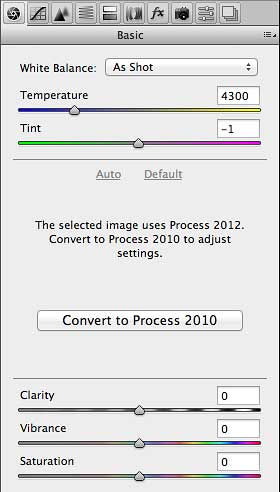
  • You can preserve edits made using Process Version 2012 in Lightroom 4 in a raw file you’ve imported into Photoshop CS5 as a Smart Object. However, you won’t be able to change Basic panel develop settings unless you switch back to Process Version 2010, as shown in the figure below. If you want to import Lightroom 4 raw files as Smart Objects into Photoshop and then edit them using Process Version 2012, you’ll need Adobe Camera Raw 7, which is available only with Photoshop CS6.

Raw image from Lightroom 4 as Smart Object in Photoshop CS5 with Adobe Camera Raw 6.7

  • You can import raw formats from new cameras such as the Canon EOS 1D X, Canon EOS 5D Mk III, Nikon D4, Nikon D800, Nikon D800E
  • More lenses have been added to the list of lens correction profiles.

For more information about new features and bug fixes, read the blog post by Lightroom product manager Tom Hogarty:

Lightroom Journal: Adobe Camera Raw 6.7 and DNG Convertor 6.7 Now Available on Adobe.com

As usual, you can read the release notes and download the installers from

http://www.adobe.com/downloads/updates/

or:

To update Photoshop and Camera Raw directly, start Photoshop and choose Help > Updates.

Also as usual, DNG Converter is useful for bringing the latest camera raw support to versions of Photoshop before Photoshop CS5.