Adobe Lightroom Classic and Lightroom

Updates: Adobe Camera Raw 6.7 and DNG Converter 6.7

Adobe has released Camera Raw 6.7 and DNG Converter 6.7. This release is important for Photoshop CS5 users who use Lightroom 4. What’s notable in this release:

  • You can preserve edits made using Process Version 2012 in Lightroom 4 in a raw file you’ve imported into Photoshop CS5 as a Smart Object. However, you won’t be able to change Basic panel develop settings unless you switch back to Process Version 2010, as shown in the figure below. If you want to import Lightroom 4 raw files as Smart Objects into Photoshop and then edit them using Process Version 2012, you’ll need Adobe Camera Raw 7, which is available only with Photoshop CS6.
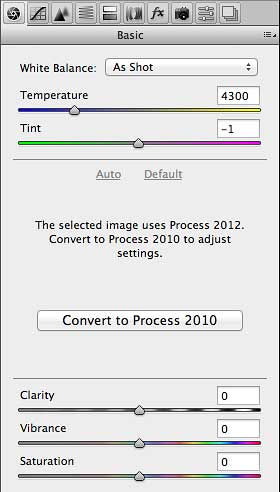
Raw image from Lightroom 4 as Smart Object in Photoshop CS5 with Adobe Camera Raw 6.7

  • You can import raw formats from new cameras such as the Canon EOS 1D X, Canon EOS 5D Mk III, Nikon D4, Nikon D800, Nikon D800E
  • More lenses have been added to the list of lens correction profiles.

For more information about new features and bug fixes, read the blog post by Lightroom product manager Tom Hogarty:

Lightroom Journal: Adobe Camera Raw 6.7 and DNG Convertor 6.7 Now Available on Adobe.com

As usual, you can read the release notes and download the installers from

http://www.adobe.com/downloads/updates/

or:

To update Photoshop and Camera Raw directly, start Photoshop and choose Help > Updates.

Also as usual, DNG Converter is useful for bringing the latest camera raw support to versions of Photoshop before Photoshop CS5.

Read my Lightroom 4 review on CreativePro.com

My Lightroom 4 review just got published by CreativePro.com, so if you’re still on the fence about this major upgrade to Lightroom, you can read about my take on the new features and changes!

Go to Review: Adobe Photoshop Lightroom 4

Adobe Photoshop Lightroom 4 review

Lightroom 4 is out!

Adobe Photoshop Lightroom 4 Develop module

Adobe Photoshop Lightroom 4 is officially released. I’ve had a great time with the public beta and am really looking forward to using the final version. Want to learn more about it? Try these links, which I update over time:

Announcement on the Lightroom blog at adobe.com (includes a list of changes from the Lightroom 4 public beta)

Review at dpreview.com

List of changes between Lightroom 4 and Lightroom 3 by Victoria Bampton

Before you order, remember to check all of your professional memberships and educational associations to see if discounts on Adobe software are part of your membership. I used a discount code to save 15% on my upgrade price.

Potential gotchas

List of known problems. (March 12, 2012) The official Lightroom blog has posted a Lightroom Hot Issues document, including the point curve conversion bug reported by A.J. Wood. If you’re running into a problem with Lightroom 4 or just want to know what you’re in for when you upgrade, check there first. Lightroom Queen Victoria Bampton adds a few issues of her own.

Before you convert your Lightroom 3 catalog, optimize it and back it up! This can help prevent problems during conversion. To optimize, choose File > Optimize Catalog. When backing up, if you don’t want to turn on automatic backups, in the Catalog Settings dialog box you can select When Lightroom Next Exits and it will back it up just that one time, while also checking the catalog for integrity.

If you open raw files from Lightroom 4 into Photoshop, keep in mind that the raw processing engine inside Lightroom 4 is now ahead of the one in Camera Raw 6, which comes with Photoshop CS5.5. To successfully preserve the raw settings from Lightroom 4 in Camera Raw 6, you’ll need a newer version of Camera Raw. While that isn’t officially available yet, a test version is available at Adobe Labs. Since it isn’t final, if you run into problems you can report them to Adobe. If you don’t want to go through all that, when you open raw files from Lightroom 4 into Photoshop and the Camera Raw warning appears, just click the Render Using Lightroom button. That converts the raw file into Photoshop format while preserving how it looked in Lightroom 4.

Can’t find Fill Light and Recovery anymore? It isn’t a problem; those features are still present but work differently in Lightroom 4 when adjusting the redesigned and renamed Basic panel sliders when using the new Process Version 2012. The intent was not to take those features away, but make them more effective overall.  Read more about this on the Lightroom blog.

Mac OS X 10.7 Lion: Will Adobe apps and other software work?

Lion iconIf you’ve got a fast Internet connection, a recent Mac, and US$29, what’s stopping you from downloading the just-released 10.7 Lion upgrade to Mac OS X? For many people, what stops them is being unsure whether the software they have is still going to work. In this article I’ve collected various reports I’ve run into around the web.

(more…)