LinkedIn

Prints on display: Ida Culver House group show

Several of my photographs, including new work, are on display in a group show named “A Place Called Home” at Ida Culver House in Broadview (north Seattle). The show is up from July 22 to October 31, 2010.

The reception is on Thursday, July 22, 2010 from 5:30 to 7:30 p.m.

RSVP: 206-361-1989 by July 19. See you on the 22nd!

Click to download “A Place Called Home” poster and reception info (PDF document)

A Place Called Home exhibition flyer

Image selected for PCNW Long Shot notecards

Ante Rush, 5:46 a.m.

Ante Rush, 5:46 a.m.

My image Ante Rush, 5:46 a.m. has been selected to be part of a set of images printed on note cards for sale as part of the Long Shot group exhibition at Photo Center NW. Pick one up on June 4, 2010 by coming to the preview at 4 p.m. or during the free party from 6 p.m. to midnight! When you buy this notecard, all proceeds will go to support the Photo Center NW school and its programs.

Long Shot is a 24-hour photo fundraiser, which is why this image was taken so early in the morning. Over 180 photographers around the world shot images in support of Photo Center NW, and on June 4 you’ll be able to see and buy prints of many of the images we shot throughout those 24 hours. Get there early if you want the best selection of affordable art at the show.

You can also support PCNW without buying a print; simply donate directly to Long Shot by entering my name as the Long Shot photographer you’re sponsoring on the PCNW donation form.

For more information, see the Long Shot blog and the Photo Center NW web site.

PCNW is at 900 12th Avenue (corner of 12th Ave and E Marion St) in Seattle.

See you there on June 4!

Print on display: Photo Center NW Long Shot exhibition

Dead of Night, 4:55 a.m.

Dead of Night, 4:55 a.m.

My image Dead of Night, 4:55 a.m. will be on display as part of the Long Shot group exhibition at Photo Center NW. Check it out up close on June 4, 2010 by coming to the preview at 4 p.m. or during the free party from 6 p.m. to midnight! If you buy this framed print, all proceeds will go to support the Photo Center NW school and its programs.

Long Shot is a 24-hour photo fundraiser, which is why this image was taken in the middle of the night. Over 180 photographers around the world shot images in support of Photo Center NW, and on June 4 you’ll be able to see and buy prints of many of the images we shot throughout those 24 hours. Get there early if you want the best selection of affordable art at the show.

You can also support PCNW without buying a print; simply donate directly to Long Shot by entering my name as the Long Shot photographer you’re sponsoring on the PCNW donation form.

For more information, see the Long Shot blog and the Photo Center NW web site.

PCNW is at 900 12th Avenue (corner of 12th Ave and E Marion St) in Seattle.

See you there on June 4!

Color Management without the Jargon video: now available!

[Note: I now have a newer video, Color Management for Photographers and Designers (2014), that updates what I covered in Color Management without the Jargon (2009). Color Management for Photographers and Designers includes more current information about color-managing Photoshop, Lightroom, and Adobe Creative Suite applications as well as demonstrations of profiling a display, a printer, and a camera.]

Are you a photographer or designer and still not quite sure how color management works? Confused about how to use color profiles? Have you tried to read books and articles about color management, but are overwhelmed by the terminology?

Color Management without the Jargon cover

Now you can better understand color management with my DVD and online video, Color Management without the Jargon: A Simple Approach for Designers and Photographers Using the Adobe Creative Suite. I created this video as an approachable introduction to the ideas behind color management and the basics of a good color management workflow. While there’s a lot of good material about color management out there, I feel that much of it jumps into jargon and abstract concepts too quickly. I saw an opportunity to explain color management in the simplest possible terms. I intend Color Management without the Jargon to prepare you for and to complement the deeper, more comprehensive, but also far more challenging material out there.

What you’ll learn

This 1½ hour training video helps beginning and intermediate Photoshop, Bridge, InDesign, and Illustrator users understand the basics of color management, including how to profile monitors and create consistent color in a production workflow. This video provides technical background without being overwhelming, and presents concepts and steps that are easy to follow.

How to watch

You can order Color Management without the Jargon as a DVD from your favorite bookseller or store, or you can watch it online as a streaming video from Peachpit Video. Here are some links to get you started:
DVD on Amazon.com
DVD on Peachpit.com
Watch online at Peachpit.com

More info

Below is the publisher’s marketing copy if you want to learn a bit more…

Every digital photographer or graphic designer knows that color management is important, but many still do not calibrate their computer monitors or understand how color works in different spaces. This 90-minute DVD will help beginning and intermediate Photoshop, Bridge, InDesign, and Illustrator users understand the basics of color management and how to create consistent color in their workflow.

Highlights of this accessible and easy-to-follow DVD video include:

  • Calibrating your monitor and digital SLR camera
  • Tackling color profile detective work in Photoshop and InDesign
  • Assigning, converting, and embedding profiles
  • Managing color output for print and the Web
  • Integrating raw files and Lightroom into your workflow
  • Handling color conversions between video-editing software and Photoshop

The supporting 48-page printed reference guide provides additional links and content.

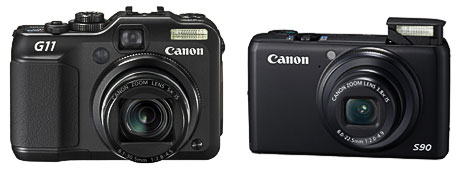
Canon announces PowerShot G11 and S90 compacts

20090819_loRes_g11_s90_front
I don’t write about every camera announcement, but these two are noteworthy. While Canon announced six new compact cameras on August 19, there were two in particular that I knew my friends and I would be interested in. The PowerShot G11 is the successor to the G10, a rather large compact with professional features. The PowerShot S90 resurrects the S-series that had more manual control and capabilities that most other point-and-shoots. These announcements affect me since I’m in the market to replace my 5-year-old Canon point-and-shoot, but there’s also quite a bit of intrigue behind this particular set of upgrades.

Please note that this post is not a review, but a commentary on the announcement. The cameras will be available in September 2009.

The Megapixel Wars: Over?

For several years, Canon ratcheted up its megapixel counts like all the other camera companies: 12 megapixels in the G9, 14 megapixels in the G10. But photographers increasingly complained (and rightly so) that not only did more megapixels not guarantee better images by themselves, in some cases they hurt image quality through increased noise. And at the same time making file sizes larger, which reduced the effective capacity of memory cards, hard drives, and CPUs.

Then last year, Panasonic came out with the Lumix DMC-LX3. Many were surprised that it held the pixel count to just 10 megapixels while all other companies raced upwards. That, and the fact that it has a relatively fast lens, may be the reason it also produces images that are thought by many to be better than the G10 in low light. It also has a wider wide end than many compact cameras, which makes it more useful for indoor use. For these reasons plus its raw output capability, many photography enthusiasts embraced the LX3 and it’s been back-ordered for many months. I thought it would be my next compact camera, but I can’t get one. The specific improvements to the Canon PowerShot G11 and S90—faster lens, better low light performance, more reasonable megapixels, and a shocking drop down to 10 megapixels—resemble the strong points of the LX-3 so much that one has to ask: Did the apparent popularity of the LX-3 make it enough of a threat for Canon to have to defend against the LX3 directly? Did Canon believe that they could not continue to maintain image quality from such small sensors if the pixel count went up further?

I think there may be more to it than that, since Canon also decided to bring back the swivel screen to the G series and the raw format to the S series. Now that more people use their camera phone as their point-and-shoot, did Canon feel they had to provide (or restore) more value in the compact range so that serious photographers would have a reason to buy a camera between a JPEG-based point-and-shoot and a digital SLR?

Comparing the PowerShot G11 to the PowerShot S90

With all that context in mind, you might want to compare the G11 and S90 since they’re so curiously similar. These two cameras use the same extended dynamic range sensor and new Digic 4 processor going up to ISO 3200, and both can save in raw format. Here are a few of the important differences between them.

Reasons to get the Canon PowerShot G11 (list price USD$499) over the S90:

  • Hotshoe that supports Speedlites (and hopefully wireless triggers)
  • Longer telephoto range
  • Slower lens (f/2.8)
  • Better face detection
  • Closer focusing distance (1cm)
  • More ISO steps
  • Shutter speed up to 1/4000
  • Slightly faster frames-per-second burst rate

Reasons to get Canon PowerShot S90 (list price USD$429) over the G11:

  • Smaller size is a lot more pocketable
  • Faster lens (f2) for better low-light shooting
  • Slightly bigger LCD screen (same number of pixels, though)
  • Interesting control ring around the lens to which you can assign a function, such as ISO speed

The Canon Shell Game

With their point-and-shoots, Canon has a really annoying way of taking features away and adding them back in a later version with no apparent rhyme or reason. As the G series progressed, people noticed that the swivel screen went away. When the S80 came out, raw format support disappeared. Now both are back. The swivel screen has returned in the G11, and the S90 brings back the ability to save images in raw format.

So what’s missing? Both cameras are capable of only 640×480 30fps video, a strange underachievement in an era of at least 720p HD video on competing cameras. One imagines that video will get a boost in the next generation, but that Canon might once again take away something useful in exchange. Maybe one day Canon will put out a compact where all of the right features actually exist in the same model, but that hasn’t happened yet.

The Details

I’ve only talked about the aspects of these two new cameras that I found to be a notable departure from Canon’s usual pattern. For full details, check out the info at the Canon USA site:

Canon PowerShot G11

Canon PowerShot S90

Voting with Dollars

Which one will I choose? Good question. Canon now has two cameras which in theory should keep people from going over to the LX3. But in addition to the fact that we should wait for the reviews to roll in, the LX3 is a year old now, and with all the fall photo expos just around the corner, is Panasonic about to play their next card?…

The good news is that with the expansion of choice, it’s now harder to pick the wrong advanced compact camera.

(Update: I bought the Panasonic LX3 because the fast aperture is nearly constant throughout the zoom range, for the hot shoe, and for the 720p 16:9 video capability. And I’m pretty happy with it!)