LinkedIn

Prints on display: “Structures in Light”

Architecture, light, and color

I’m showing dramatic, colorful architectural photography, including images from two countries and three American states. These images come out of my recent experiments with expressive color processing and lens corrections, which I’ve had lots of fun exploring.

The photographs are on display for all of March and April 2011 at Herkimer Coffee in north Seattle. The cafe doesn’t host art receptions, but you can meet and talk with me there on Friday, March 11, from 4:30-6 p.m. leading into the March Greenwood Art Walk, or the same time Saturday April 9 if you can’t get away on weekdays (they always close at 6). Herkimer Coffee is on the corner of N 74th St and Greenwood Ave N in Seattle. Click for a map.

The Walled Sky

The Walled Sky

Prints on display: “Sacred, Spiritual Spaces and Icons” group show

Sacred, Spiritual Places and Icons

Artistic interpretations of inspiring, peaceful, reflective places and objects

View several of my photographs from Spain and India as part of a large group show at the University House retirement community in Issaquah, WA. You can see the show from March 12 to July 4, 2011.

The gala reception is on Saturday, March 12, 2011 from 2:00 to 4:00 p.m, with live music and appetizers. If you go, please RSVP to 425-557-4200 by March 9. See you on the 12th!

Click to download the “Sacred, Spiritual Places and Icons” postcard and reception details (PDF document)

Sacred Spiritual Places and Icons exhibition flyer

(Photograph in group show flyer is by Michael Rainwater)

Updating the Process Version in Camera Raw 6 and Lightroom 3: Peachpit.com article

Process version before and after conversion

Before (left) and after (right) updating the process version

Have you wondered about the mysterious little exclamation point icon that shows up when you edit older raw images in Adobe Camera Raw 6 or Adobe Photoshop Lightroom 3? You can use it to migrate your existing raw format images to the new processing technology in Camera Raw 6 and Lightroom 3. In my latest Peachpit.com article, I explain the process version of a raw photo and how updating it will give you more detail and less noise, even with your oldest raw photos!

Click the link below to read the article at Peachpit.com:
Updating the Process Version in Camera Raw 6 and Lightroom 3

This article is an expanded version of a topic in my book, Real World Adobe Photoshop CS5 for Photographers (Adobe Press).

Exploring Creative Lens Correction: Peachpit.com article

Image of article

The new Lens Correction feature in Adobe Photoshop CS5, Adobe Camera Raw 6.1 or later, and Adobe Photoshop Lightroom 3 does a great job of removing various forms of distortion that you find in all kinds of lenses—from phone cameras to $1500 pro lenses. But there’s nothing stopping you from taking Lens Correction a step further: using it as a creative tool that can strengthen your compositions and spice up your images.

Click the link below to read the article at Peachpit.com:
Exploring Creative Lens Correction in Adobe Photoshop CS5 and Lightroom 3

Discover better photos by getting high (or low)

It’s easy to fall into the trap of seeing a subject, shooting at eye level, and simply moving on; I have to remember to break out of that habit all the time. Walking past a building site the other night, I was intrigued by the color and perspective of the green pipes they brought in. The way the pipes leaned out over the new walls looked like a battleship gun Terry Gilliam would dream up. The eye-level shot I took really didn’t do anything for me and I deleted it, but I really wanted to make the shot work. I remembered to try pushing the pipes up into the sky or down into the ground simply by moving the camera up and down. As a result, I got two shots I liked a whole lot more than the eye-level shot.

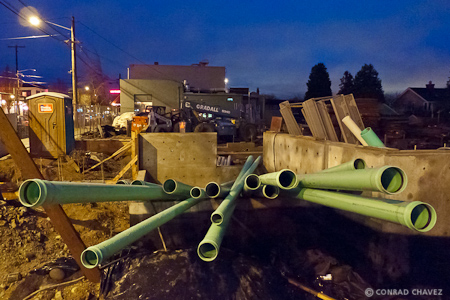
Fire Station 21 pipes looking up

Fire station pipes looking down

For the first shot I lowered the camera to about a foot off the ground, and for the second shot I raised the camera as far up as my arms could reach. That simple 6-foot difference produced two noticeably different images.

What the photos don’t show is the chain-link fence around the building site. To make the fence disappear, I moved the camera right up to the fence and shot through it. The fence turned out to be more of a help than a hindrance, because I was able to brace the camera on the fence with both hands to steady a long exposure enough for the camera’s image stabilization to be able to make up the difference. This was made easier because I was shooting with my pocket camera, a Panasonic DMC-LX3 set to shoot raw at ISO 1600. If it had been an SLR, I wouldn’t have been able to rest the entire lens inside one of the chain link holes.

It was the screen on the back of the camera that let me compose the shots without having to lie on the wet ground or finding a ladder. There’s a rather significant group of photographers that’s devoted to the optical viewfinder, and they tend to take a dim view of shooting with any electronic viewfinder. These two shots are examples of why I don’t agree with them. On the camera screen I was able to compose and check the composition at the edges, level (with the help of the on-screen grid option), and check exposure with the help of the histogram and clipping display, and I could do it with the camera at an odd angle far from my face. Being able to read the screen from a distance freed me up to create two very different compositions from the same spot on the sidewalk.

When processing the shot later in Lightroom 3.3, noise reduction, Clarity, and Vibrance were very helpful in cleaning up the image and punching up the color and local contrast. High ISO shadows can be a little purple on this camera, so I reduced the purple saturation in the Hue/Saturation/Lightness panel.